We independently review everything we recommend. When you buy through our links, we may earn a commission. As an Amazon Associate we earn from qualifying purchases.
4 Best Alarm Clocks with USB Charger (November 2026)
Compare the best alarm clocks with USB charger for your nightstand: dual USB ports, dimmable displays, dual alarms and FM radio in four bedside picks.
Compare the best alarm clocks with USB charger for your nightstand: dual USB ports, dimmable displays, dual alarms and FM radio in four bedside picks.
A bedside clock that also charges your phone solves a nightly problem: the outlet behind the nightstand is already taken, the charging cable snakes across the floor, and the phone ends up face-down on a pile of books. With a built-in USB port, the phone charges where the time is displayed, and the alarm still sounds even if the phone battery dies overnight. The real decision is not whether the clock tells time, but how much charging power it delivers, how readable the display stays in a dark room, and whether the alarm setup fits the way you sleep.
This guide is for light sleepers who want a gentle wake-up, heavy sleepers who need a loud buzzer, couples on different schedules, and anyone whose nightstand has run out of outlets. Each clock below was chosen from the name and specifications on its Amazon product page, with the USB output, display size, alarm options and backup features checked against the listing first.
Quick Picks
As an Amazon Associate we earn from qualifying purchases
Product
Best for
Key spec
JALL Digital Alarm Clock with FM Radio
A bedroom that needs two charging ports and a night light
5-inch LED display with 2 USB charging ports
Sharp SPC547 Digital Alarm Clock
A simple, easy-to-read bedside clock with fast phone charging
2 AMP high-speed USB charging port
Emerson ER100301 SmartSet Alarm Clock Radio
A clock radio that sets itself and streams music by Bluetooth
USB output for mobile charging at 2.1A 5V
Emerson CKS1521 SmartSet Bluetooth Alarm Clock Radio
A colourful bedside clock with its own accent lighting
USB charging port at 1.5A with 1.4-inch orange LED display
How to Choose
Check the USB output before anything else
A USB port on a clock is only useful if it delivers enough current for the device plugged into it. A 1-amp port trickles charge into a phone overnight and may not keep up with a tablet at all, while a 2-amp or 2.1-amp port fills a phone much faster and handles larger devices. Count how many gadgets you charge at the bedside: one port covers a phone, but a second port means a partner’s phone or a pair of earbuds can charge at the same time without an extra adapter. Read the listing for the exact output, such as 5V/1A or 5V/2.1A, and remember that the clock itself still needs its own wall power to run the charger.
Decide how bright the display should be at night
A clock display that looks crisp at noon can feel like a lamp at 2 a.m., so dimming control matters more than display size alone. Look for several brightness levels, an auto-dimmer that drops the display after dark, or a pitch-dark mode that turns the numbers off entirely. Large digits help anyone who reads the time without glasses, while coloured digits and a night light suit a child’s room or a guest bedroom. Test the dimmer range in the listing: three levels may be enough, but five levels give finer control over a glow that stays visible without lighting up the whole room.
Match the alarm to your sleep pattern
One alarm is fine for a single sleeper with a fixed schedule, but two independent alarms cover a couple with different start times or a weekday routine that changes on weekends. Some clocks offer wake-up modes for every day, weekdays only or weekends only, plus a choice of buzzer, radio or a natural tone, and a snooze button that is easy to find half asleep. Heavy sleepers should look for adjustable volume with a genuinely loud top setting and an alarm that keeps ringing until it is switched off. A battery backup that preserves the time and alarm settings through a power cut is worth having on any clock you rely on for work.
Weigh the extras against the clutter they add
FM radio, Bluetooth speakers, sleep sounds and sunrise lighting all sound appealing, yet each extra feature adds buttons, menus and a learning curve to a device you operate in the dark. A radio with station presets suits a bedroom where the clock doubles as a morning news source, and a Bluetooth speaker makes sense when the nightstand has no other speaker. Sleep sounds and a night light help children settle, while a plain clock with a big display and one USB port is the better pick for a guest room or an older relative. Choose the extras you will actually use, and skip the ones that turn a simple alarm into a gadget that needs its manual.
The 4 Best Options
JALL Digital Alarm Clock with FM Radio
Top Pick
JALL Digital Alarm Clock with FM Radio
Best for: A shared bedroom where two phones charge overnight and the alarm needs to suit two different sleepers.
5-inch LED display with 5 brightness levels and a pitch-dark mode
2 USB charging ports, charging range 5V/1A-2.1A
Dual alarms with 7 natural tones or FM radio wake-up
The JALL clock is the most versatile pick here because it pairs two USB charging ports with a large 5-inch LED display, dual alarms and an 8-colour night light, so it covers charging, waking and ambient lighting from one bedside device. Seven natural wake-up tones or FM radio give the alarm a gentler start than a plain buzzer, and the sleep sound timer plays calming sounds for up to 8 hours before switching itself off. Five brightness levels plus a pitch-dark mode keep the display readable by day and unobtrusive at night, while the memory backup holds the settings through a power cut.
Watch out for: The many features mean more buttons to learn, so keep the manual nearby until the alarm and timer settings feel familiar.
Sharp SPC547 Digital Alarm Clock
Runner-Up
Sharp SPC547 Digital Alarm Clock
Best for: Anyone who wants a no-fuss bedside clock that charges a phone fast and stays readable without glasses.
2 AMP high-speed USB charging port for phones and tablets
Sharp built the SPC547 around one clear idea: a clock that is easy to read and charges a phone quickly. The large LED display is designed for easy reading across the room, the operation stays simple with straightforward buttons, and the 2-amp USB port charges phones and tablets at twice the rate of a conventional 1-amp port. There is no radio or Bluetooth speaker to configure, which makes this the least fiddly clock in the group and a sensible choice for a bedroom, a guest room or an office desk where the clock should simply show the time and keep a phone topped up.
Watch out for: The single USB port charges one device at a time, so a second phone still needs its own outlet or adapter.
Emerson ER100301 SmartSet Alarm Clock Radio
Emerson ER100301 SmartSet Alarm Clock Radio
Best for: A bedroom where the clock doubles as a Bluetooth speaker and a radio, and nobody wants to reset the time after a power cut.
USB output for mobile charging at 2.1A 5V
Bluetooth 4.1 digital tuning FM radio with 20 station memories
1.4-inch cyan LED clock display with dimmer control
Patented SmartSet automatic time setting system with Daylight Saving Time adjustment
Emerson’s ER100301 is the pick for buyers who want the clock to look after itself. The patented SmartSet system sets the correct year, month, date, day and time as soon as the clock is plugged in, and adjusts for Daylight Saving Time without any button presses. Bluetooth streaming turns the clock into a bedside speaker, the FM radio stores 20 station presets, and a 2.1-amp USB output charges a phone or tablet overnight. A 1.4-inch cyan LED display with dimmer control stays legible after dark, and a button cell battery keeps the time and alarm settings safe when the power drops.
Watch out for: The cyan display and night light add a glow to the room, so check the dimmer range if you sleep in total darkness.
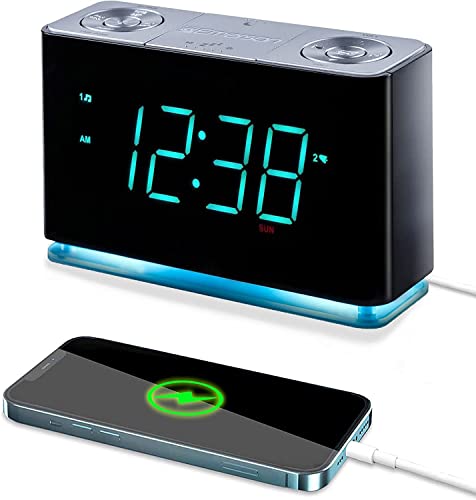
Emerson CKS1521 SmartSet Bluetooth Alarm Clock Radio
Emerson CKS1521 SmartSet Bluetooth Alarm Clock Radio
Best for: A bedroom or dorm room where a warm orange glow and automatic time setting matter more than a second USB port.
USB charging port at 1.5A
1.4-inch orange LED display with orange LED accent light
Bluetooth dual alarm clock radio with FM radio and AUX input
Patented SmartSet automatic time setting with Daylight Saving Time adjustment
The CKS1521 trades the ER100301’s cyan display for a bold 1.4-inch orange LED display with a matching orange accent light, giving the nightstand a warmer look while keeping the same self-setting convenience. SmartSet sets the time and date on plug-in and handles Daylight Saving Time automatically, the built-in USB port charges a phone overnight at 1.5 amps, and two independent alarms can be scheduled for every day, weekdays only or weekends only. Bluetooth streaming and an AUX input cover music from a phone or another audio device, and the auto-dimmer lowers the display brightness as the room darkens.
Watch out for: The 1.5-amp USB output charges more slowly than the 2-amp ports on other clocks here, so a nearly empty phone may need the full night to fill.
Which One Fits Your Situation
You charge two devices every night
Pick the JALL clock. Its two USB ports charge a phone and a second device at the same time, the 5-inch display is the largest in this guide, and the dual alarms with separate wake-up tones suit two people on different schedules. The night light and sleep timer are bonuses that cost nothing extra in outlet space.
You want the simplest clock possible
Pick the Sharp SPC547. It has one job beyond telling the time: charging a phone quickly through its 2-amp USB port. The easy-to-read display and plain controls suit a guest room, an older relative’s bedroom or anyone who dislikes menus and setup screens, and there is nothing to configure before the first night.
You want the clock to set itself
Pick either Emerson, and choose the ER100301 if you also want a stronger charger. SmartSet sets the correct time and date the moment the clock is plugged in, so there is no fiddling with hour and minute buttons after a move or a power cut. The ER100301 adds a 2.1-amp USB output and Bluetooth streaming for a fuller bedside setup.
You sleep lightly and hate a bright display
Pick the JALL clock for its pitch-dark mode, which switches the display off completely, or the Emerson CKS1521 for its auto-dimmer that lowers the orange display as the room darkens. Both let the room stay dark while the alarm still works, and both keep the phone charging through the night.
Common Mistakes
Buying a clock for its USB port without checking the output: a 1-amp port charges a tablet so slowly that it may lose charge while in use.
Placing the clock where the display faces the bed at full brightness, then discovering the dimmer only has two levels and the lowest is still too bright.
Setting a single alarm when two people share the room, so one partner’s early start wakes the other every morning.
Relying on a phone alarm as backup and then finding the clock’s USB port was never actually charging the phone because the cable was loose.
Skipping the battery backup check: without it, a short power cut overnight can reset the clock and silence the morning alarm.
Frequently Asked Questions
Do alarm clocks with USB chargers charge a phone as fast as a wall adapter?
It depends on the port’s output. A 2-amp or 2.1-amp USB port on a clock charges a phone at a similar rate to a standard wall adapter, while a 1-amp port is noticeably slower and better suited to overnight trickle charging. Check the listing for the exact output, such as 5V/1A or 5V/2.1A, before buying.
Will the alarm still sound if the power goes out overnight?
Only if the clock has a battery backup that preserves the time and alarm settings. Many clocks use a button cell or AAA batteries for backup, while others lose their settings the moment the power drops. If you depend on the alarm for work, confirm the backup type on the product page.
Can I charge a tablet from an alarm clock USB port?
A tablet charges best from a 2-amp or 2.1-amp port, and slowly or not at all from a 1-amp port. The JALL clock and the Emerson ER100301 both supply enough current for a tablet, while the Sharp SPC547’s 2-amp port also handles one. Check the tablet’s own charging requirement against the clock’s stated output.
Does the USB port work when the alarm is not set?
Yes, on the clocks in this guide the USB charging port runs independently of the alarm. The port draws power from the clock’s own wall connection, so a phone charges whenever the clock is plugged in, whether or not an alarm is armed for the morning.
M
Melu Editorial Team
We compare specs, materials and verified owner reviews before a product earns a spot. Rankings are never paid.
Affiliate disclosure. As an Amazon Associate we earn from qualifying purchases at no extra cost to you. Prices accurate as of the date shown.
Compare five doorbell cameras for wired and battery homes, covering video clarity, motion alerts, storage, chimes and ongoing costs for your front door.
Find the best cheesecake singapore serves, from molten Basque burnt cakes and light Japanese souffle to rich New York slices, with tips for every craving.
Thin film batteries and fast-charging supercapacitors explained: how solid-state thin film cells work, where they are used, how they pair with capacitors, and the criteria that matter when choosing them.
The best Nikon battery replacement options compared: EN-EL15c spares from BM Premium, Wasabi Power, STK and SmallRig, with capacity, decoding and charger notes for Z and D-series cameras.
Find the best grow room thermostat for your tent or room: four plug-in temperature and humidity controllers compared by outputs, load capacity, sensor and app control.
The best battery powered fishfinders compared: castable Garmin and Deeper sonar plus the iBobber, with battery life, depth range, GPS mapping and app details to help you choose.
Compare the best 18V lithium battery packs from Milwaukee, Ryobi and Bosch by platform, amp-hours, fuel gauge and charge time, and pick the right pack for your tools.


 Emerson CKS1521 SmartSet Bluetooth Alarm Clock Radio