We independently review everything we recommend. When you buy through our links, we may earn a commission. As an Amazon Associate we earn from qualifying purchases.
4 Best 17 Inch Laptops Not for Gaming (November 2026)
Compare the best 17 inch laptops not for gaming for work, study and everyday use, with big screens, strong everyday speed and long battery life.
Compare the best 17 inch laptops not for gaming for work, study and everyday use, with big screens, strong everyday speed and long battery life.
A 17-inch laptop that is not built for gaming solves a different problem from a gaming machine. The buyer is not chasing frame rates or a dedicated graphics card. The real decision is how much screen space, keyboard comfort and everyday speed you get for work, study and streaming, without paying for gaming hardware you will never use. A large display makes spreadsheets, documents and video calls easier to read. The trade-off is weight and size, so the right pick depends on whether the laptop mostly stays on a desk or travels with you every day.
This article is for office workers, students and anyone who wants a big-screen laptop for everyday tasks. The four laptops below were chosen from the names and specifications shown on their Amazon product pages, focusing on models with integrated graphics built for productivity rather than gaming. Each one is a 17-inch or 17.3-inch machine, and each is covered below with its key specifications, who it fits best and what to check before buying.
Quick Picks
As an Amazon Associate we earn from qualifying purchases
A 17-inch laptop gives you room to place two windows side by side, which matters when you compare documents, work in a spreadsheet while reading email, or follow a video lesson while taking notes. Look for a Full HD resolution of 1920 by 1080 as a minimum, since lower resolutions make text look soft on a panel this large. An IPS panel keeps colours and contrast steady when you view the screen from an angle. An anti-glare coating reduces reflections under office lighting, and a brightness of 300 nits keeps the display readable in a bright room. A touchscreen is a bonus for some buyers, but it is not essential for office work.
Processor and memory for everyday work
For non-gaming use, the processor and memory decide how smoothly the laptop handles your daily workload. A modern six-core or eight-core processor such as the Ryzen 5 7430U, Ryzen 7 7730U or Core i7 in the LG gram 17 handles office apps, browsers with many tabs and video calls. Memory matters just as much: 8GB is enough for light office work and browsing, while 16GB gives you comfortable headroom for large spreadsheets, photo editing and running several programs at once. A 32GB configuration suits buyers who keep dozens of tabs open alongside accounting software or design tools. Choose memory for the workload you will have in a year, not just today.
Storage, ports and connectivity
Fast storage makes a bigger difference to everyday speed than most buyers expect. A solid-state drive loads Windows, opens large files and wakes the laptop from sleep far quicker than an older spinning drive, so 512GB is a sensible minimum and 1TB suits buyers who store photos, videos and large files locally. Check the ports before you buy: a laptop that will sit on a desk benefits from HDMI for an external monitor, USB-C for a modern dock, and at least two USB-A ports for a mouse and a headset. Wi-Fi 6 keeps wireless connections stable on a busy home network, and Bluetooth lets you pair wireless headphones and a mouse without using a port.
Weight, battery life and keyboard comfort
A 17-inch laptop is never as light as a 13-inch ultrabook, so weight and battery life deserve a close look. Most models in this class weigh around two kilograms, fine on a desk but noticeable in a bag carried across a campus all day. The LG gram 17 is the exception, with a lightweight design built for carrying. Battery life claims vary, so treat them as a guide and expect less with a bright screen and several apps running. A full-size keyboard with a numeric keypad is one of the main reasons to buy a 17-inch laptop, so check that the keys feel comfortable and a backlit keyboard is included for dim rooms.
The 4 Best Options
HP 17 Laptop (Ryzen 5, 32GB RAM)
This HP 17 is the multitasking pick in this roundup. Its 32GB of memory and large combined storage let you keep a browser full of tabs, a spreadsheet, a presentation and a video call open at the same time without the machine slowing down. The 17.3-inch Full HD anti-glare display gives documents and web pages plenty of room, and the AMD Ryzen 5 7430U processor handles office software, streaming and light photo work with ease. Windows 11 Home and Microsoft Office come included, so the laptop is ready for work straight out of the box.
Specs
Display: 17.3-inch Full HD (1920 x 1080) anti-glare screen, 300 nits brightness
Processor: AMD Ryzen 5 7430U, 6 cores
Memory: 32GB RAM
Storage: 1.5TB total (1TB PCIe SSD with HP P500 512GB portable SSD)
Operating system: Windows 11 Home with Microsoft Office
Model year: 2025
Best for: Office workers and students who run many apps and browser tabs at once.
Watch out for: Confirm the portable SSD bundle is included in the configuration you order, since bundled accessories can vary by listing.
ASIN: B0DWY84YSW
ASUS Vivobook 17 (Ryzen 7, 16GB RAM)
Top Pick
ASUS Vivobook 17 (Ryzen 7, 16GB RAM)
Best for: Everyday work, study and video calls with a bright, wide-angle display.
The ASUS Vivobook 17 pairs an eight-core AMD Ryzen 7 7730U processor with 16GB of memory and a 1TB solid-state drive, a combination that suits demanding everyday work such as large spreadsheets, research with many open documents and video conferencing. Its 17.3-inch Full HD IPS display shows text and images clearly from a wide viewing angle, and the backlit keyboard makes late-evening work comfortable. A fingerprint reader adds quick and secure sign-in, while the 720p HD camera covers video calls. This is a well-rounded choice for anyone who wants a capable big-screen laptop without gaming hardware.
LG gram 17 (Core i7, 16GB RAM)
Runner-Up
LG gram 17 (Core i7, 16GB RAM)
Best for: Students and mobile professionals who carry a 17-inch laptop every day.
The LG gram 17 is built for buyers who want a large screen they can actually carry. It weighs far less than most 17-inch laptops, which makes it a strong fit for students and professionals who move between classrooms, offices and home. The 17-inch WQXGA display offers more vertical space than a standard Full HD panel, so long documents and web pages need less scrolling. Inside, the 13th Gen Intel Core i7 Evo platform, 16GB of memory and a 1TB solid-state drive handle office work, streaming and multitasking smoothly. It runs Windows 11 Home and comes in a black finish.
HP 17 Laptop 17-cp3401nr (Ryzen 5, 8GB RAM)
HP 17 Laptop 17-cp3401nr (Ryzen 5, 8GB RAM)
Best for: Home office work, study and streaming on a modest budget.
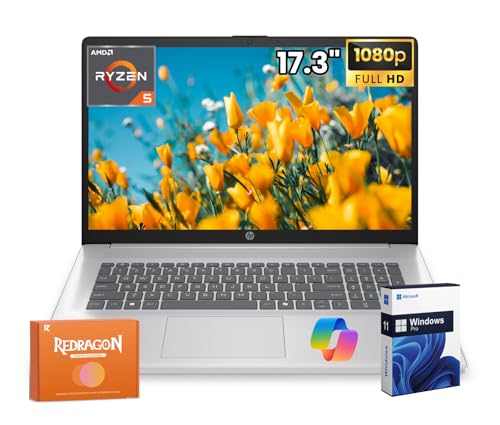
This HP 17 is the straightforward choice for buyers who need a big screen and solid everyday speed without extra memory or storage they will not use. The AMD Ryzen 5 7430U processor, 8GB of memory and 512GB solid-state drive cover email, word processing, spreadsheets, browsing and streaming comfortably. Its 17.3-inch Full HD display with 300 nits of brightness keeps text readable in a bright room, and Windows 11 Pro adds business-friendly features. Wi-Fi 6 and Bluetooth 5.4 keep wireless connections fast and stable, while the built-in HD camera handles video calls and the Copilot AI key puts the assistant within reach.
Which One Fits Your Situation
You work with many apps open all day
Choose the HP 17 Laptop with the Ryzen 5 processor and 32GB of memory. Its large memory capacity is the deciding factor when you juggle a browser, email, spreadsheets and a video call at the same time. The 1.5TB of total storage also leaves room for large files, and the bright anti-glare display keeps long work sessions comfortable.
You want a capable all-rounder for work and study
Choose the ASUS Vivobook 17 with the Ryzen 7 processor. Its eight-core processor and 16GB of memory handle demanding everyday tasks smoothly, the IPS display looks good from any angle, and the backlit keyboard and fingerprint reader add everyday convenience. It suits students and office workers who want one laptop that covers everything.
You carry your laptop everywhere
Choose the LG gram 17. Its lightweight design is the main reason to pick it, since most 17-inch laptops are heavy to carry. The high-resolution WQXGA display gives you extra room for documents, and the Core i7 processor with 16GB of memory keeps performance strong for office work and study on the move.
You want a big screen without spending more than you need
Choose the HP 17 Laptop 17-cp3401nr. It covers the essentials: a large Full HD display, a capable Ryzen 5 processor, fast solid-state storage and Windows 11 Pro. It is the right pick when your work is mostly email, documents, browsing and video calls, and you would rather keep things simple.
Common Mistakes
Buying a gaming laptop for office work and paying for a dedicated graphics card you will never use.
Choosing a 17-inch laptop with only 8GB of memory when you regularly keep dozens of browser tabs open.
Ignoring the display panel and ending up with a dim screen that is hard to read in a bright room.
Forgetting to check the ports, then discovering there is no HDMI output for a second monitor.
Overlooking storage size and running out of room for photos, videos and project files.
Frequently Asked Questions
Is a 17-inch laptop too big for everyday use?
A 17-inch laptop is not too big if it mostly stays on a desk, where the large screen is an advantage. It becomes a burden only when you carry it in a small bag every day or work in tight spaces. For frequent travel, a lightweight model such as the LG gram 17 keeps the big screen without the usual weight.
Do I need a dedicated graphics card for office work?
No, a dedicated graphics card is not needed for office work, web browsing, streaming or video calls. The integrated graphics in the processors used by the laptops in this article handle those tasks well. A dedicated card matters mainly for gaming and heavy video editing, so skipping it keeps the laptop cooler, quieter and usually lighter.
How much memory should a non-gaming 17-inch laptop have?
For light office work and browsing, 8GB of memory is enough. For comfortable everyday use with several programs open at once, 16GB is the sweet spot and the amount most buyers should aim for. Choose 32GB only if you regularly work with very large spreadsheets, many browser tabs and several heavy applications at the same time.
Can a 17-inch non-gaming laptop handle video calls and streaming?
Yes, all four laptops in this article handle video calls and streaming without trouble. Each one has a built-in camera, Wi-Fi for stable connections and a processor with integrated graphics that manages video playback smoothly. For the clearest calls, sit in a well-lit room and use a headset or earphones to reduce echo.
M
Melu Editorial Team
We compare specs, materials and verified owner reviews before a product earns a spot. Rankings are never paid.
Affiliate disclosure. As an Amazon Associate we earn from qualifying purchases at no extra cost to you. Prices accurate as of the date shown.
Compare five doorbell cameras for wired and battery homes, covering video clarity, motion alerts, storage, chimes and ongoing costs for your front door.
Find the best cheesecake singapore serves, from molten Basque burnt cakes and light Japanese souffle to rich New York slices, with tips for every craving.
Thin film batteries and fast-charging supercapacitors explained: how solid-state thin film cells work, where they are used, how they pair with capacitors, and the criteria that matter when choosing them.
The best Nikon battery replacement options compared: EN-EL15c spares from BM Premium, Wasabi Power, STK and SmallRig, with capacity, decoding and charger notes for Z and D-series cameras.
Find the best grow room thermostat for your tent or room: four plug-in temperature and humidity controllers compared by outputs, load capacity, sensor and app control.
The best battery powered fishfinders compared: castable Garmin and Deeper sonar plus the iBobber, with battery life, depth range, GPS mapping and app details to help you choose.
Compare the best 18V lithium battery packs from Milwaukee, Ryobi and Bosch by platform, amp-hours, fuel gauge and charge time, and pick the right pack for your tools.