We independently review everything we recommend. When you buy through our links, we may earn a commission. As an Amazon Associate we earn from qualifying purchases.
Best Cameras for Indoor Guitar Playing
Compare cameras for indoor guitar playing, framed for recording and streaming at home, with flip screens, microphone inputs and clean streaming output.
Compare cameras for indoor guitar playing, framed for recording and streaming at home, with flip screens, microphone inputs and clean streaming output.
As an Amazon Associate we earn from qualifying purchases.
Filming yourself playing guitar indoors is a specific filming job, and this guide treats it that way from the first line. Nobody here is looking for a camera to photograph a guitar on a stand. The task is recording and streaming a person playing, in a room, usually alone, usually seated, with the guitar occupying the lower half of the frame and both hands needing to stay visible and in focus. Every camera below is chosen and discussed only in that framing: as a tool for recording practice sessions, lessons, covers and live streams from a desk, a music corner or a small home studio.
That framing changes what matters. Indoors with a guitar, you care about a screen that flips around so you can check framing from the chair, autofocus that holds your face and hands as you lean into a chord change, a lens wide enough to fit the headstock and the strumming hand in the same shot, microphones good enough that the guitar sounds like a guitar, and an easy way to stream or use the camera as a webcam. Low light matters too, because most practice rooms are lit by ordinary lamps.
The four cameras below cover four sensible routes into that job. Two are interchangeable-lens mirrorless cameras with large sensors, the Sony ZV-E10 and the Canon EOS M50 Mark II. One is a fixed-lens compact built for creators, the Sony ZV-1. One is a mirrorless camera whose headline feature is its audio system, the Panasonic LUMIX G100 with its tracking microphone. All four are cameras and nothing else, all four state video, streaming or webcam capability on their product pages, and each section explains the page-stated specifications that make the camera work for indoor guitar recording.
Disclosure: This article contains affiliate links. If you buy through these links, we may earn a commission at no additional cost to you.
How to Choose a Camera for Indoor Guitar Playing
Start with the frame you actually need
A seated guitarist needs width more than reach. The camera typically sits one to two metres away, and the shot has to contain your face, the guitar body, the fretting hand up the neck and the strumming or picking hand over the soundhole or pickups. A kit lens that starts at a wide focal length, a compact lens with a 24mm-equivalent wide end, or a 12mm starting point on a Micro Four Thirds kit all serve that need. When you read a product page, check the lens range first and picture the chair, not a landscape.
A flip or free-angle screen is close to essential
You will set up alone, sit down, pick up the guitar, and only then discover the headstock is out of frame. A vari-angle or free-angle screen that faces forward lets you compose from the playing position and check focus before you record a full take. Every camera in this guide has a forward-facing or free-angle screen solution stated on its page. Treat a fixed rear screen as a genuine drawback for this use, however good the sensor behind it is.
Autofocus has to track a moving player
Playing guitar moves your hands constantly and shifts your upper body with the rhythm. Look for fast hybrid autofocus, real-time eye autofocus and tracking, stated on the Sony and Canon pages here, because those systems hold focus on your face while your hands move in front of it. For lesson filming, reliable tracking matters more than the highest video resolution on the list.
Sound is half the product
A guitar video with poor sound fails even when the picture is sharp. Built-in directional microphones, such as the three-capsule designs on the Sony pages and the OZO system on the Panasonic, capture a usable room sound with no extra equipment. A 3.5mm microphone jack lets you place a separate microphone closer to the guitar than the camera is. Streaming setups often send the guitar through an audio interface into the computer while the camera supplies only the picture, which is where clean HDMI and webcam functions earn their place.
Decide how you will publish before you buy
If you record to a memory card and edit later, any of these cameras works. If you stream live or teach over video calls, look for the stated streaming paths: USB streaming on the ZV-E10, Wi-Fi livestreaming plus clean HDMI and webcam utility support on the Canon, live streaming and webcam use in the ZV-1’s title, and webcam use through LUMIX software on the G100. Match the camera to the route you will actually use every week.
Indoor light rewards larger sensors and bright lenses
Ordinary room lighting is dim by camera standards. A larger sensor, APS-C in the Sony ZV-E10 and Canon, or the one-inch sensor and fast F1.8 to F2.8 lens in the ZV-1, gathers that light more gracefully than a small sensor straining at high sensitivity, keeping the picture clean in the evening, when most practice happens.
The Cameras
1. Sony Alpha ZV-E10 — APS-C Mirrorless Built for Streaming Yourself
Top Pick
1. Sony Alpha ZV-E10 — APS-C Mirrorless Built for Streaming Yourself
View on Amazon: https://www.amazon.com/dp/B09CG8L75M
Sensor stated on page: 24.2MP APS-C Exmor CMOS with BIONZ X processor
Video stated on page: 4K movie oversampled from 6K, full pixel readout
Autofocus stated on page: fast hybrid AF, real-time eye AF and real-time tracking
The Sony ZV-E10 is the most complete answer here for a guitarist who records and streams from one fixed indoor spot. The bundle listing used for this guide is a Sony ZV-E10 mirrorless camera body package, and the model’s page content describes a 24.2 megapixel APS-C Exmor CMOS sensor with a BIONZ X processor, 4K movie recording oversampled from 6K with full pixel readout, fast hybrid autofocus with real-time eye autofocus and real-time tracking, and a side-opening vari-angle LCD screen. Each of those specifications maps directly onto the guitar task: the large sensor handles room light, the eye autofocus holds your face while your hands move, and the vari-angle screen faces you in the chair.
Audio is a first-class feature here. The page describes a built-in directional three-capsule microphone with a wind screen, a 3.5mm microphone jack and a Multi Interface shoe. Indoors, the directionality matters most: it favours the sound in front of the camera, which is you and the guitar. When you outgrow the built-in microphone, the jack and shoe let you add one positioned for the guitar without replacing the camera.
For streaming, the page states the simplest path here: easy live streaming with a single USB cable and no extra hardware or software. The interchangeable E-mount also gives the setup a future, because a wider or brighter lens can be added later while the body stays.
Choose the ZV-E10 if recording and streaming your playing is a regular habit and you want one camera that covers lessons, covers and live sessions from the same chair. It asks the most setup of the cameras here, in exchange for the strongest stated combination of sensor size, autofocus and streaming simplicity.
2. Canon EOS M50 Mark II with 15-45mm Kit — The Lesson-Friendly All-Rounder
The Canon EOS M50 Mark II kit pairs the camera with an EF-M 15-45mm IS STM lens, and its page describes a 24.1 megapixel CMOS sensor with a kit aimed squarely at content creators and vloggers. For guitar filming, the kit lens starting at 15mm is the practical headline: at the wide end it frames a seated player and a full guitar from a short indoor distance, so the camera can live on a desk or a shelf rather than across the room.
The streaming story on this page is the broadest of the four. Canon describes using the camera to livestream content with built-in Wi-Fi, using it with EOS Webcam Utility software as a webcam alternative, shooting vertically as well as horizontally when a different angle is needed, and clean HDMI output for high-resolution, high frame-rate streaming. A guitar teacher can therefore move between recorded lessons, live streams and video calls with the same camera, choosing the connection that suits each platform, and the clean HDMI path suits a more permanent desk setup with a capture device.
Talking to camera is, in filming terms, almost exactly what a guitar lesson is: a seated person, framed from the waist up, explaining and demonstrating in turns. The vari-angle touchscreen format lets you frame that shot from the chair and tap to focus where you want attention, on your face for the explanation or down toward the fretboard for the demonstration.
Choose the M50 Mark II kit when you want a ready-to-film package, camera and lens together, with the widest choice of streaming routes and a lens range that suits a small room from the first day.
View on Amazon: https://www.amazon.com/dp/B08KSKV35C
Sensor stated on page: 24.1MP CMOS sensor
Lens in kit: EF-M 15-45mm f/3.5-6.3 IS STM, model 4728C006
Streaming stated on page: livestreaming with built-in Wi-Fi, EOS Webcam Utility support, clean HDMI output
Shooting stated on page: vertical as well as horizontal video
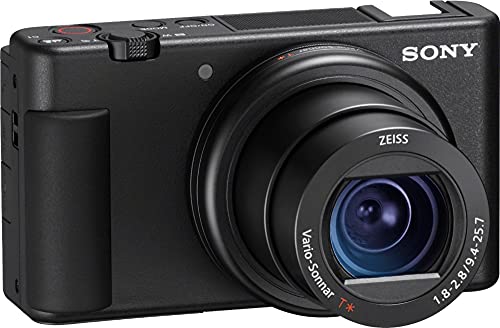
3. Sony ZV-1 — The Compact That Needs No Lens Decisions
Runner-Up
3. Sony ZV-1 — The Compact That Needs No Lens Decisions
View on Amazon: https://www.amazon.com/dp/B08965JV8D
Sensor stated on page: 20.1MP one-inch Exmor RS CMOS, stacked with DRAM
Lens stated on page: 24-70mm F1.8-2.8 ZEISS Vario-Sonnar T, fixed
Video stated on page: 4K HDR video, flip screen and touchscreen display
The Sony ZV-1 removes the lens question entirely. Its page describes a 20.1 megapixel stacked one-inch Exmor RS CMOS sensor behind a fixed ZEISS Vario-Sonnar T lens of 24-70mm with a large F1.8 to F2.8 aperture, 4K HDR video, a flip screen, a touchscreen display, and live video streaming and webcam use in its very title. For indoor guitar playing, that bright fixed lens is the story: 24mm at the wide end frames a seated player in a small room, and the wide maximum aperture keeps evening practice sessions looking clean under household lighting.
Sound receives the same attention as on its mirrorless sibling. The page describes a forward-directional on-board microphone with a detachable wind screen, a standard 3.5mm microphone jack and a Multi Interface shoe, so the path from simple to serious audio stays open. Start with the built-in microphone for practice diaries and quick covers, then add a microphone near the guitar for recordings you intend to publish, all without changing cameras.
The ZV-1’s other advantage is low friction. It lives on a small tripod beside the practice chair, ready in seconds, with no lens to choose or store. The trade-off is fixed framing: you move the tripod, not the lens, and its one-inch sensor is smaller than the APS-C sensors above.
Choose the ZV-1 if you want the simplest serious setup for filming your playing at home, with bright optics and proper microphone options in a single compact body.
4. Panasonic LUMIX G100 with 12-32mm Lens — The Audio-Led Choice
4. Panasonic LUMIX G100 with 12-32mm Lens — The Audio-Led Choice
View on Amazon: https://www.amazon.com/dp/B08B7W6L82
System stated on page: Micro Four Thirds interchangeable lens, 12-32mm lens included, model DC-G100KK
Video stated on page: 4K 24p/30p and Full HD 60p, V-Log L supported
Audio stated on page: OZO Audio by Nokia spatial recording with built-in microphone tracking
The Panasonic LUMIX G100 earns its place in a guitar guide through its ears. Its page describes a Micro Four Thirds interchangeable-lens camera with a 12-32mm lens, 4K photo and video recording at 24p and 30p plus Full HD at 60p, a 3.0-inch free-angle touch rear monitor, 5-axis hybrid image stabilisation, and high-quality spatial audio recording integrating OZO Audio by Nokia, with a built-in microphone system described as tracking its subject. A guitar is a sound source that moves slightly as you play and fills a room unevenly, so a microphone system designed to follow the subject and capture spatial sound is directly relevant rather than a novelty.
The 12-32mm kit lens starts wide, which helps in small practice rooms where the camera cannot retreat far from the chair. The free-angle monitor serves the same role as the flip screens above: compose from the playing position, confirm both hands are in shot, then record. Frame markers for common aspect ratios, also described on the page, help if one performance is headed for both a wide platform and a vertical clip.
For live work, the page describes webcam use through LUMIX webcam software over USB, and lists Micro HDMI output among its connections, so plan the computer side of the setup as part of the purchase. V-Log L recording is also supported for players who edit their footage afterwards.
Choose the G100 if audio character is your priority, your room is small, and your playing is as much about the sound of the instrument in the room as about the picture of your hands.
Comparison Table
Camera
Sensor
Lens
Screen for self-framing
Audio highlights stated
Streaming route stated
Sony ZV-E10 (B09CG8L75M)
24.2MP APS-C
Interchangeable E-mount, bundle body package
Vari-angle LCD
Three-capsule directional mic, 3.5mm jack, MI shoe
USB live streaming, single cable
Canon EOS M50 Mark II (B08KSKV35C)
24.1MP CMOS
EF-M 15-45mm kit included
Vari-angle touchscreen format
Creator audio options with streaming kit routes
Wi-Fi livestream, webcam utility, clean HDMI
Sony ZV-1 (B08965JV8D)
20.1MP one-inch
Fixed 24-70mm F1.8-2.8 ZEISS
Flip screen
Directional built-in mic, 3.5mm jack, MI shoe
Live streaming and webcam use
Panasonic LUMIX G100 (B08B7W6L82)
Micro Four Thirds MOS
12-32mm kit included
Free-angle touch monitor
OZO Audio spatial recording, tracking mic
Webcam software over USB, Micro HDMI
Frequently Asked Questions
Which of these cameras is easiest for streaming a guitar lesson?
On the stated features, the Sony ZV-E10 makes the simplest claim: live streaming with a single USB cable and no extra hardware or software. The Canon offers more routes, Wi-Fi livestreaming, webcam utility software and clean HDMI, which suits a permanent desk setup. The Panasonic works as a webcam through its LUMIX webcam software. Pick based on whether you value one-cable simplicity or a fixed, multi-route desk rig.
Do I need a separate microphone to film guitar indoors?
Not to begin. The Sony cameras state directional built-in microphones, and the Panasonic states a spatial audio system with subject tracking, all designed to capture the person in front of the camera clearly. A separate microphone, connected through the 3.5mm jacks stated on the Sony pages, becomes worthwhile when the guitar’s tone itself is the subject, because a microphone can sit closer to the instrument than the camera can.
How far from the camera should I sit?
Close enough that the lens at its wide end frames your face, the guitar body and both hands, usually an ordinary desk-to-chair distance. Use the flip screen from the chair to set the shot once, note where the tripod stands, and return it to the same spot for consistent framing.
Which camera handles dim evening practice rooms best?
The larger sensors and brighter optics have the advantage: the APS-C sensors in the ZV-E10 and the Canon, and the ZV-1’s one-inch sensor behind an F1.8 to F2.8 lens. All three are built to keep indoor footage clean under ordinary lighting.
Can these cameras record long practice sessions?
They record to memory cards as ordinary video cameras, and each also has a streaming or webcam route. For very long sessions, players commonly capture through a computer instead, which the USB and HDMI routes here support, or simply record in takes.
Conclusion
For indoor guitar playing, framed strictly as recording and streaming yourself at home, the choice comes down to how you work. The Sony ZV-E10 offers the strongest stated mix of APS-C image quality, tracking autofocus, directional audio and one-cable streaming. The Canon EOS M50 Mark II kit is the ready-made lesson camera, with a wide-starting kit lens and the broadest set of streaming routes on its page. The Sony ZV-1 is the low-friction compact, bright-lensed and microphone-ready with nothing to assemble. The Panasonic LUMIX G100 leads on sound, with spatial tracking audio and the widest-starting kit for small rooms. Set any of the four on a tripod at the end of the practice space, frame from the chair using its forward-facing screen, and the camera disappears, leaving just you and the guitar.
M
Melu Editorial Team
We compare specs, materials and verified owner reviews before a product earns a spot. Rankings are never paid.
Affiliate disclosure. As an Amazon Associate we earn from qualifying purchases at no extra cost to you. Prices accurate as of the date shown.
Compare the best smartwatches for lg phones with Wear OS, GPS, heart rate and sleep tracking, plus battery life details to pair with your LG handset today.
Compare the best cpu coolers with push pins for Intel builds, covering tool-free mounting, socket fit, fan noise and low-profile options for simple installs.
Four spotting scopes that pull double duty after dark, compared on aperture, magnification range and eyepiece options, with listing specs for each pick.
Four broadheads for low poundage bows compared by grain weight, blade style and cutting diameter, with every spec taken from the Amazon listing itself.
Compare four bow sights that fit Mathews risers, including Bridge-Lock dovetail sliders and a five-pin React model, by pin count, pin size and mount type.
The best ultrawide creator monitors for workstation upgrades pair color accuracy with UWQHD resolution and USB-C hubs. Compare five displays for editing.
Compare the best CPAP backup battery packs, from a 99.9Wh travel pack to 266Wh and 297Wh multi-night packs, with the outputs and cables each one states.
Compare five binoculars for glasses wearers, from long eye relief models to an eyeglass-friendly pair, and match eye relief, size, and use to your needs.